Top 6 Rugged Tablets for QField Work in 2026
Best Rugged Tablets for QField in 2026: 5 Picks for GIS Fieldwork
QField turns your tablet into a mobile GIS workstation — but the app is only as good as the hardware it runs on. Drop a consumer tablet on a rocky trail, and your entire day of data collection disappears with the cracked screen. Use one with a dim display, and you can’t see your map in sunlight. Pick one with weak GPS, and your field points are off by 10 meters.
Content of the page
For serious GIS fieldwork — surveying, environmental mapping, utility inspections, forestry — you need a rugged tablet with accurate GPS, a sunlight-readable screen, and enough durability to survive mud, rain, and the occasional drop onto concrete.
After researching the current options and checking what GIS professionals are actually using in the field, here are the 5 best tablets for QField in 2026.
Quick recommendation: The Samsung Galaxy Tab Active5 is the best overall choice for most QField users — rugged, affordable, great GPS, and it runs QField natively on Android. If you need centimeter-level accuracy with RTK, pair it with an external GNSS receiver.
What QField Needs from a Tablet
Before the picks, here’s what actually matters for QField specifically:
Operating system: QField runs on Android, iOS, and Windows (via QField or QGIS). Android tablets offer the best balance of price, ruggedness, and app performance. Windows rugged tablets are overkill unless you also need to run full QGIS desktop in the field.
GPS accuracy: QField relies on the tablet’s GPS for geolocating features. Consumer tablets typically offer 3–5 meter accuracy. Most rugged tablets have dual-band GPS (L1+L5) for sub-meter accuracy. For centimeter precision, you’ll need an external RTK GNSS receiver connected via Bluetooth.
Display brightness: Outdoor fieldwork means direct sunlight. You need at least 500 nits for usable visibility. The best rugged tablets offer 800–1,000 nits with anti-glare coatings.
Durability ratings: Look for MIL-STD-810G/H (military drop/shock/vibration testing) and an IP rating of IP68 (dust-tight + waterproof submersion). Anything below IP65 is risky for field conditions.
Battery life: A full day of QField with GPS active drains batteries fast. You want 8+ hours of real-world use, or a hot-swappable battery system.
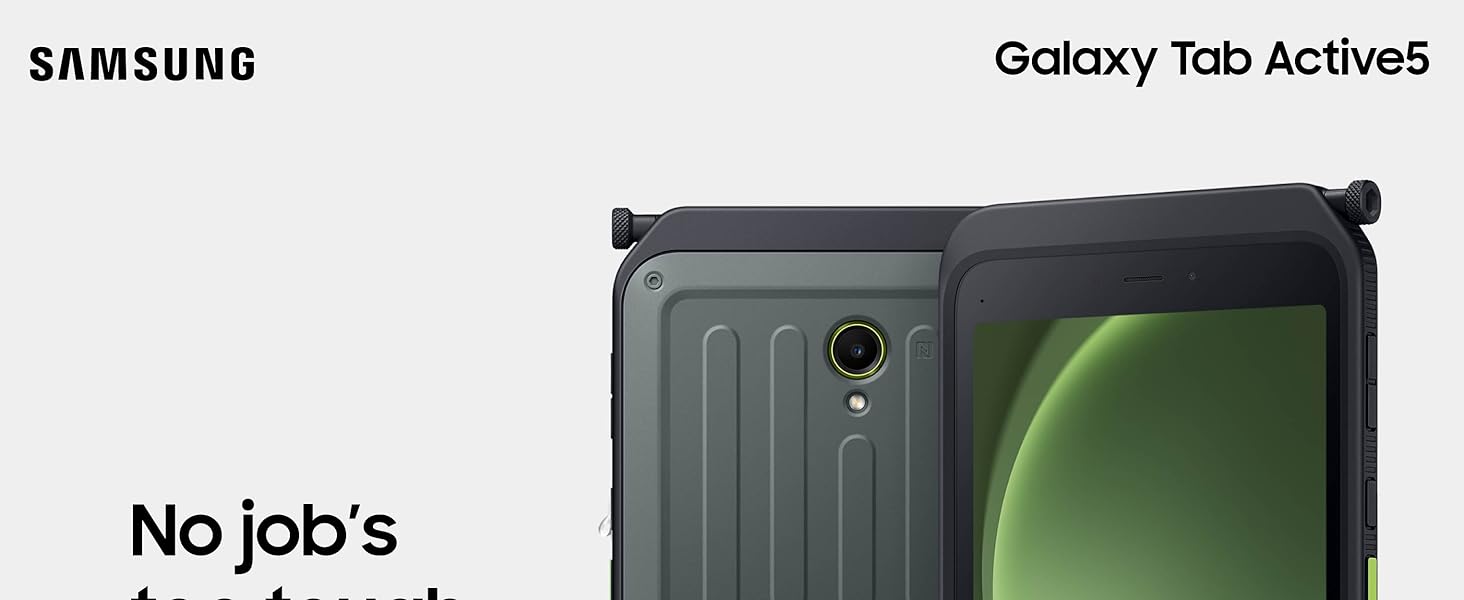
1. Samsung Galaxy Tab Active5 — Best Overall for QField
Price: ~$550 | OS: Android 14 | Screen: 8″ / 120Hz | IP Rating: IP68 | MIL-STD: 810H | Battery: 5,050 mAh (removable)
The Galaxy Tab Active5 is the tablet that GIS professionals recommend most in forums like the Esri Community and QField GitHub discussions. Samsung’s Active line has been the default choice for fieldwork for years, and the Active5 continues that legacy.
Why it works for QField:
The 8-inch screen is the sweet spot for field mapping — large enough to see your layers and digitize features, but small enough to hold with one hand or mount on a pole with an external GNSS antenna. It runs Android 14 natively, so QField installs directly from the Play Store with no sideloading needed.
GPS uses dual-band positioning for improved accuracy over standard consumer tablets. It won’t give you centimeter-level precision on its own, but paired with a Bluetooth RTK receiver (like a Emlid Reach RS3 or Trimble DA2), you get full survey-grade positioning.
Durability is the real selling point. IP68 means it’s fully dust-tight and survives submersion in 1.5 meters of water for 30 minutes. MIL-STD-810H certification covers drops from 1.5 meters onto steel, temperature extremes (-21°C to 71°C), vibration, and humidity. The touchscreen works with wet hands and gloves — critical for rain and cold weather fieldwork.
The removable battery is a feature that many rugged tablets have abandoned. For all-day fieldwork, carry a spare and swap in seconds without shutting down (Samsung’s battery hot-swap keeps the tablet alive for about 1 minute during the switch).
Limitations: The 8-inch screen can feel cramped if you’re working with complex multi-layer projects. No built-in stylus (but supports S Pen as an accessory). The 5,050 mAh battery lasts about 6–8 hours with GPS active — adequate but not exceptional.
2. Samsung Galaxy Tab Active4 Pro — Best Value (Still Excellent)
Price: ~$450 (often discounted) | OS: Android 12L (upgradable to 13) | Screen: 10.1″ | IP Rating: IP68 | MIL-STD: 810H | Battery: 7,600 mAh (removable)
If the Active5 is too expensive or you prefer a larger screen, the Active4 Pro remains a fantastic option and is now available at significant discounts since the Active5 launched.
Why it works for QField:
The 10.1-inch display gives you substantially more screen real estate for working with detailed GIS layers. The 7,600 mAh battery lasts longer than the Active5 (roughly 8–10 hours with GPS active), and it’s also removable/hot-swappable.
Same IP68 and MIL-STD-810H ratings as the Active5. It includes a No Battery Mode where the tablet can run purely from a power source — useful for vehicle-mounted setups.
GPS performance is comparable to the Active5. The slightly older Snapdragon 778G processor handles QField without any issues.
Why choose this over the Active5? Larger screen, bigger battery, lower price. The Active4 Pro is the better pick if you’re equipping a team on a budget or prefer the 10.1″ form factor for office-to-field workflows.
Limitations: Heavier than the Active5 (makes it less ideal for pole-mounted use). The display brightness maxes at around 600 nits — good but not as readable in harsh sunlight as the Active5’s newer panel.
3. OUKITEL RT8 — Best Budget Rugged Tablet
Price: ~$300–350 | OS: Android 14 | Screen: 11″ FHD+ | IP Rating: IP68/IP69K | MIL-STD: 810H | Battery: 20,000 mAh
If your budget doesn’t stretch to Samsung, the OUKITEL RT8 is a surprisingly capable alternative that has gained popularity among GIS field workers who need a rugged tablet without the enterprise price tag.
Why it works for QField:
The standout feature is the 20,000 mAh battery — genuinely massive. This tablet can run QField with GPS active for 2+ days without charging. If you’re doing multi-day fieldwork in remote areas without power access, nothing else comes close.
It runs Android 14 with a MediaTek Helio G99 processor and 8–12 GB of RAM, which handles QField smoothly. The 11-inch FHD+ display is excellent for visualizing large map areas. IP68/IP69K rating means it survives not just submersion but also high-pressure water jets (IP69K).
Limitations: GPS accuracy is noticeably below Samsung’s Active line — expect 3–5 meter accuracy from the built-in receiver. The display brightness isn’t specified clearly, and real-world reports suggest it’s adequate but not outstanding in direct sunlight. Build quality and software support don’t match Samsung (expect fewer OS updates and slower security patches). You won’t find enterprise features like Knox or FOTA deployment.
Best for: Budget-conscious users, environmental monitoring, habitat surveys, and situations where centimeter accuracy isn’t critical but all-day battery life is.
4. Panasonic Toughbook G2 — Best for Running Full QGIS in the Field
Price: ~$2,500–3,500 | OS: Windows 11 Pro | Screen: 10.1″ (1,000 nits) | IP Rating: IP65 | MIL-STD: 810H | Battery: Up to 18.5 hours (hot-swappable)
If you need to run full desktop QGIS (not just QField) in the field, the Toughbook G2 is the industry standard. This is a completely different class of device — a full Windows PC in a rugged tablet form factor.
Why it works for GIS fieldwork:
The 1,000-nit display is the brightest on this list, readable in the harshest direct sunlight. The Intel Core i5/i7 processor handles full QGIS, ArcGIS Pro, and CAD software without compromise. Hot-swappable dual batteries provide up to 18.5 hours of operation — the best battery life by far.
The modular design lets you add serial ports, ethernet, barcode scanners, or a dedicated GPS module through interchangeable expansion packs. This makes it uniquely adaptable for specialized surveying workflows.
Limitations: The price puts it out of reach for most individual users or small organizations. IP65 (not IP68) means it’s dust-tight and splash-resistant but not submersion-proof. It’s also heavier and thicker than the Android options. QField runs on Windows too, but the experience is more optimized on Android.
Best for: Professional surveying firms, government agencies, and users who need full desktop GIS software on the go. Not a casual purchase — this is enterprise equipment.
5. Getac F110 — Best Compact Windows Rugged Tablet
Price: ~$1,800–2,500 | OS: Windows 11 Pro | Screen: 11.6″ (1,000 nits) | IP Rating: IP66 | MIL-STD: 810H | Battery: Hot-swappable, ~8 hours
The Getac F110 is a more compact and slightly more affordable alternative to the Toughbook G2 for users who need Windows but don’t need the Panasonic’s modular expansion system.
Why it works for GIS fieldwork:
The 11.6-inch, 1,000-nit display is excellent for field mapping. It supports LumiBond sunlight-readable technology with rain and glove touch modes. Intel 12th/13th Gen processors handle QGIS and other desktop GIS software capably.
Built-in options for dedicated GPS, 4G/5G LTE, and U-blox GNSS receivers make it a self-contained field mapping station. The hot-swappable battery system ensures uninterrupted data collection.
Limitations: Similar to the Toughbook — expensive, heavy, and overkill if you’re only running QField (which works perfectly well on a $450 Samsung tablet). IP66 means protected against powerful water jets but not submersion.
Best for: Utility companies, civil engineering firms, and surveying teams who need a Windows environment with field-grade durability.
Comparison Table
| Tablet | Price | OS | Screen | IP Rating | Battery | GPS | Best For |
|---|---|---|---|---|---|---|---|
| Samsung Tab Active5 | ~$550 | Android 14 | 8″ | IP68 | 5,050 mAh (removable) | Dual-band | Best overall for QField |
| Samsung Tab Active4 Pro | ~$450 | Android 12L | 10.1″ | IP68 | 7,600 mAh (removable) | Dual-band | Best value, larger screen |
| OUKITEL RT8 | ~$300 | Android 14 | 11″ | IP68/IP69K | 20,000 mAh | Standard | Budget pick, extreme battery |
| Panasonic Toughbook G2 | ~$3,000 | Windows 11 | 10.1″ | IP65 | 18.5h (hot-swap) | Optional module | Full desktop QGIS |
| Getac F110 | ~$2,000 | Windows 11 | 11.6″ | IP66 | ~8h (hot-swap) | Optional GNSS | Windows field mapping |
Do You Need an External GNSS Receiver?
The built-in GPS on any of these tablets tops out at roughly sub-meter accuracy (dual-band) or 3–5 meters (single-band). For most environmental mapping, habitat surveys, and general-purpose data collection, that’s perfectly adequate.
But if your work requires centimeter-level precision — cadastral surveys, construction staking, utility mapping — you’ll need an external RTK GNSS receiver. These connect to your tablet via Bluetooth and provide 1–2 cm accuracy when paired with a base station or correction service.
Popular options compatible with QField include the Emlid Reach RS3 (~$2,500), Trimble DA2 (~$2,000), and ArduSimple RTK receivers (~$200–500 for DIY setups). QField supports NMEA input from any Bluetooth-connected receiver through the Android mock location setting.
Accessories Worth Considering
A few additions that make a real difference for QField fieldwork:
Screen protector (anti-glare): Even with a bright display, an anti-glare protector reduces reflections and protects against scratches from dirt and tools.
Pole mount or hand strap: If you’re collecting point data while walking transects, a hand strap prevents drops. For higher GPS accuracy with an external antenna, a pole mount keeps everything stable.
Spare batteries: For the Samsung tablets, always carry at least one spare. They’re small, cheap ($30–40), and save you from running out of power in the middle of a data collection session.
Waterproof case/pouch: Even with IP68 ratings, an extra waterproof pouch protects the charging port and screen during heavy rain or river crossings.
FAQ
Can I use a regular iPad for QField?
QField does run on iOS, and iPads have excellent GPS and displays. However, no iPad is rugged-certified — a single drop on rocks can end your fieldwork. If you work in mild conditions (urban mapping, indoor inspections), an iPad with a rugged case can work. For serious outdoor fieldwork, a purpose-built rugged tablet is a much safer investment.
Which tablet do most QField users actually use?
Based on community forums (Esri, QField GitHub, GIS StackExchange), the Samsung Galaxy Tab Active series dominates. The Active4 Pro is currently the most widely deployed, with the Active5 gaining adoption rapidly. Budget users often choose the OUKITEL RT series.
Is a Windows tablet better than Android for QField?
Not for QField specifically — the app runs best on Android. Windows tablets are better if you need full desktop QGIS alongside QField, or if your organization uses Windows-only GIS software (ArcGIS Pro, Civil3D). For pure QField use, Android is the recommended platform.
How do I improve GPS accuracy on a budget?
The cheapest way to get sub-meter accuracy is to enable the “dual-band” or “L5” setting in your tablet’s location settings (if supported). For centimeter accuracy on a budget, look into ArduSimple’s RTK receivers — they start around $200–300 and work with QField via Bluetooth.
Rugged tablets built for GIS fieldwork share a surprising amount of DNA with devices designed for other demanding mobile professions. The same qualities that matter on a muddy trail — sunlight-readable displays, shock-resistant builds, and reliable performance in temperature extremes — are equally critical in a truck cab. If you’re curious how those same durability benchmarks translate to a completely different use case, the best tablets for truck drivers in 2026 offer a useful parallel perspective on what truly tough hardware looks like in practice.
GIS fieldwork isn’t limited to foot-based surveys — many professionals collect data from vehicles, whether patrolling pipelines, inspecting road infrastructure, or mapping rural routes. In those scenarios, a rugged tablet paired with a solid in-cab setup makes all the difference. For drivers who also need a full computing solution between jobs, our roundup of durable laptops designed for road professionals highlights machines built to survive the same vibrations, temperature swings, and tight spaces you’d encounter in any demanding field environment.
Last updated: March 2026